
Daily summary
Comments, client messages, tasks with deadlines and meetings in one summary - instead of checking every module.
The veedeck AI agent reads your projects, clients, contractors and FF&E schedules. It sums up your day, drafts a message to your client, lays out a mood board and takes actions in every module - you just approve.

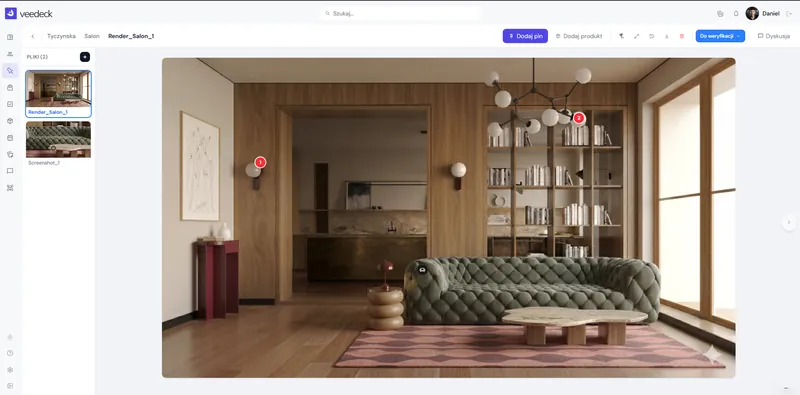
veedeck is an interior design project management platform with an AI agent built for interior designers and interior architects. The AI agent uses information about projects, clients, contractors and FF&E schedules to support the day-to-day work of a design studio.
A generic chatbot only knows what you paste into it. The AI agent works inside veedeck, so it sees what you see: projects, client conversations, tasks, FF&E schedules and your calendar. Nothing to copy, nothing to explain twice.
Real tasks from an interior designer’s day. Each one starts with a single sentence - typed or spoken.
Comments, client messages, tasks with deadlines and meetings in one summary - instead of checking every module.
Ask about a project, deadline or product. The agent finds the answer and shows which module it came from.
The client’s decisions, your to-dos and the messages you haven’t replied to yet - in a few bullet points.
A ready draft of a progress update or an approval reminder. You edit it and send it.
Client details, the assigned crew, their tasks and latest arrangements - without digging through notes.
What’s approved, what’s waiting for a decision and how many items are left in each section.
Adds a task, updates a project or a list. It always shows every change for approval first.
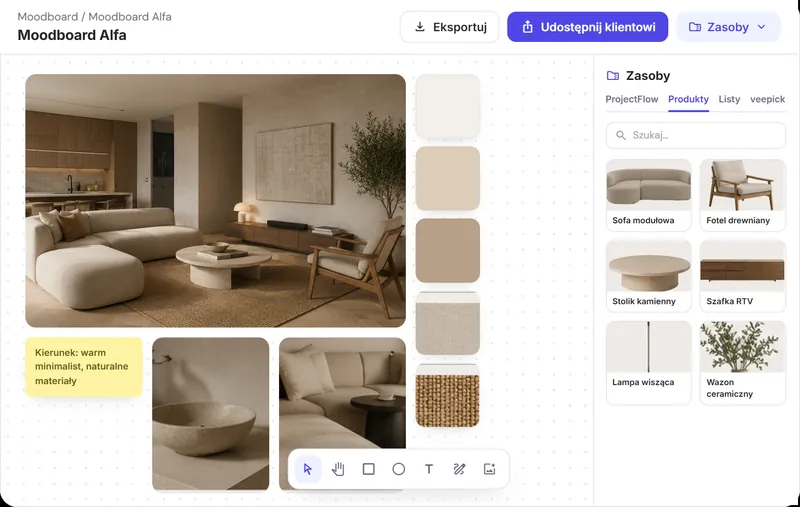
Pulls renders from the project and products from the FF&E schedule, uses templates and arranges items on the board.
Instead of opening Discussions, ProjectFlow and Tasks one by one, ask the agent what happened. You get unread file comments, client messages and items with deadlines - with links to the source.
Since yesterday in your projects: 40 new file comments and 2 client messages in the Wiśniewski house project.
“Hello! We’ve just had a look - it definitely looks better! We only have a question about the lighting over the table…”
Beata Wiśniewska · Wiśniewski house“Perfect! We can’t wait, we really like this solution.”
Beata Wiśniewska · Wiśniewski houseThe AI agent turns client conversations into one summary: decisions the client has made, what you need to do and which messages are still unanswered. It also links questions from the chat to tasks in the project.
In the Wiśniewski house - Warsaw project chat over the last 7 days:
The AI agent doesn’t just answer. It adds tasks and updates projects, lists and mood boards. Before it changes anything, it shows a “Your decision needed” card with the details.
Ask for a mood board and the AI agent pulls renders from the project and products from the FF&E schedule, uses a template and arranges the items on the board. It can also edit what’s already there.






Swipe to see the full view



Swipe to see the full view



Swipe to see the full view
Tap the microphone and speak. The text appears in the field as you talk, and the AI agent replies as soon as you send it. Handy on site, in the car and between meetings.
Example conversation. Data in the replies is for illustration only.
The agent finds information in projects, conversations and lists for you.
See where a project stands in seconds, not after a dozen clicks.
Conversation summaries and ready messages - fewer missed questions.
Know what’s urgent, what’s due and what the client is waiting for.
Projects, clients, lists and AI in one app, with no copy-pasting.
The AI agent uses the modules you already work in. That’s how it combines information about projects, clients, contractors and FF&E schedules into one answer.
See all modulesIt’s an AI assistant built into veedeck - an interior design project management platform. It answers questions about your projects, clients, contractors and FF&E schedules, prepares summaries and messages, and takes actions in the app’s modules.
Mostly by taking admin off your plate: it sums up your day, finds information, reminds you what the client is waiting for, drafts messages and adds tasks. It also helps with creative work, e.g. laying out a mood board from the project’s renders and products.
Yes. The AI agent uses the information you have in veedeck: projects, clients, contractors, tasks, FF&E schedules and conversations. The “Path” next to each answer shows which sources it used.
It gives you a quick overview across all projects: open tasks and deadlines, renders waiting for approval, unread messages and client decisions. You can then ask it to take the next step, such as adding a task.
Yes. The AI agent summarises client conversations, lists their decisions and your to-dos, points out unanswered messages and drafts messages such as progress updates or approval reminders. You can edit a message before sending it.
Yes. The AI agent works inside the veedeck app, in every module. You open it from the menu or the AI agent button, and see its answers and proposed changes next to your work.
A general chatbot only knows what you paste into it. The veedeck AI agent works with your studio’s data, shows the sources of its answers and can take actions in the app - always after you approve.
No. The agent uses what’s already in veedeck. Just ask about a project or a client. If you’re in a module, e.g. on a mood board, the agent takes it into account as the conversation context.
Yes. Tap the microphone in the input field and speak - the text appears as you talk. Then send the message as usual.
Try veedeck free for 30 days, no credit card required.